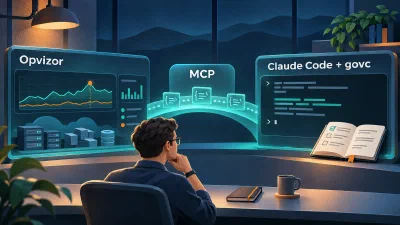
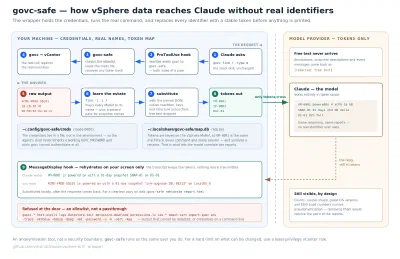
If you manage VMware environments, you already know govc, the lean, scriptable vSphere CLI from the govmomi project. And if you’ve touched Claude Code, you know it can run shell commands, reason about output, and chain steps together. Put the two together and something interesting happens: you can talk to your vSphere environment in plain language.
“Which VMs have snapshots older than three days, and how big are they?”
“Put esx03 into maintenance mode, but check cluster capacity first.”
“Give me a datastore capacity report as an HTML table.”
This post walks through a Claude Code skill I built that teaches Claude how to use govc properly, including the guardrails that stop it from doing anything you’d regret. The skill is a folder of Markdown files; no code, no plugins, no MCP server required.
Why govc and not PowerCLI or an MCP server?#
Three reasons.
govc is a single static binary. No PowerShell modules, no Python SDK version juggling. Download, set four environment variables, done. It runs identically on Linux, macOS, and Windows, which matters when your automation runs in a container or CI pipeline.
Everything is text in, JSON out. Every govc command accepts -json. That’s a perfect interface for an LLM agent: Claude runs a command, parses structured output, decides what to do next. There’s no screen scraping and no brittle UI automation.
A skill beats a wrapper. You could build an MCP server that wraps the vSphere API, but govc already is the wrapper: battle-tested, maintained by Broadcom/VMware, covering ~300 subcommands from vm.create to host.esxcli. A skill just teaches Claude the idioms: how to authenticate, how to batch queries efficiently, and which commands need a human sign-off before running.
What a Claude Code skill actually is#
A skill is a directory containing a SKILL.md file with YAML frontmatter (a name and a trigger description) plus instructions. Claude Code loads the name and description into every session; when your request matches, it pulls in the full instructions, and only then. Reference files sit alongside and get read on demand.
Mine looks like this:
govc/
├── SKILL.md                      # workflow, safety rules, command map
└── references/
    ├── setup.md                  # install, auth, TLS, vcsim
    ├── inventory-reporting.md    # find/collect/jq patterns, metrics, events
    ├── vm-lifecycle.md           # create, clone, power, migrate, guest ops
    ├── snapshots.md              # create, audit, cleanup workflow
    ├── host-cluster.md           # maintenance mode, DRS/HA, rules, esxcli
    └── storage-network.md        # datastores, disks, vSwitch/DVS
This layered structure (“progressive disclosure”) keeps the context lean. Asking for a snapshot report loads snapshots.md; the DVS documentation stays out of the way. Drop the folder into ~/.claude/skills/ (or .claude/skills/ inside a project) and it’s active.
The part that matters: safety rules#
Handing an AI agent the keys to vCenter is a trust exercise, so the skill front-loads rules Claude reads before anything else. The important ones:
Read-only first. Reporting questions get answered with *.info, find, collect, events, and metric.sample, never with anything that changes state.
Destructive commands require explicit confirmation. vm.destroy, snapshot.remove '*', datastore.rm, host.shutdown and friends are on a named list. Claude has to show you exactly which objects are affected and wait for a yes. Before any bulk operation it prints the govc find result, a de facto dry run, so you approve a list, not a pattern.
Graceful before hard. Guest shutdown before power-off, guest reboot before reset, with a fallback only when VMware Tools isn’t responding, and it says so when that happens.
Snapshots are not backups. The skill makes Claude say this out loud whenever someone treats them as backups. Some hills are worth dying on.
Are these rules bulletproof? No, they’re instructions, not a permission system. Combine them with vSphere’s actual RBAC: run govc as a role with only the privileges you’re comfortable delegating. A read-only vCenter account turns the whole skill into a reporting engine that can’t break anything.
And if sending infrastructure data to a cloud model is a non-starter in your environment, Claude Code can also run against local models via Ollama’s Anthropic-compatible API: inventory, credentials, and logs never leave your network. The skill is plain Markdown, so it works unchanged with whatever model sits behind it (expect some trade-off in reasoning depth with smaller local models).
What it looks like in practice: on a real vCenter#
Everything below ran against our testing lab (a vCenter with two datacenters and an EPYC host running 44 VMs), with Claude Code and the skill doing the work. The screenshots are lightly redacted but otherwise untouched.
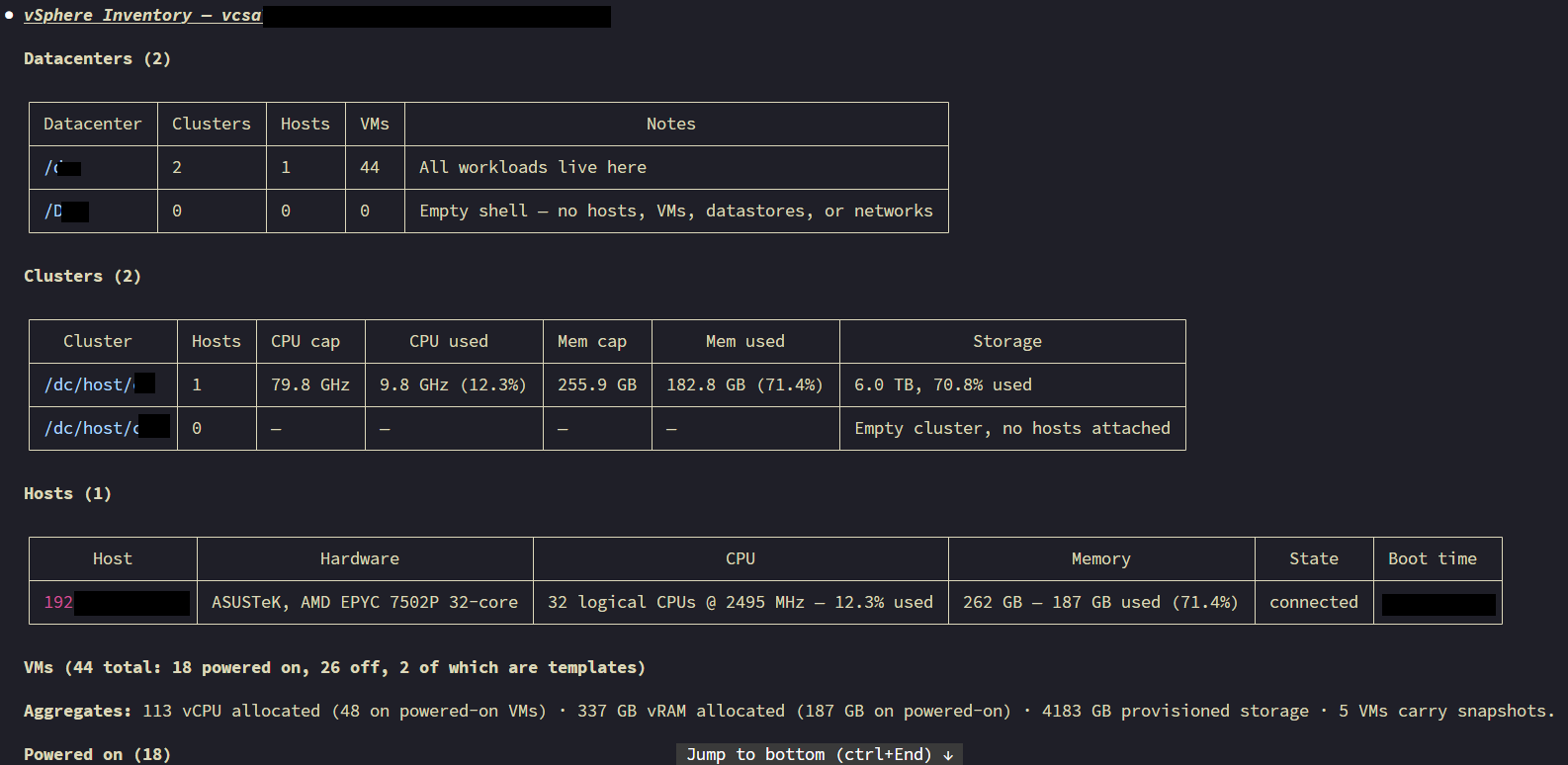
Inventory. The first prompt of the session: “Give me an inventory of this vSphere environment: datacenters, clusters, hosts, VMs.” Claude loads the skill, connects, and starts sweeping:
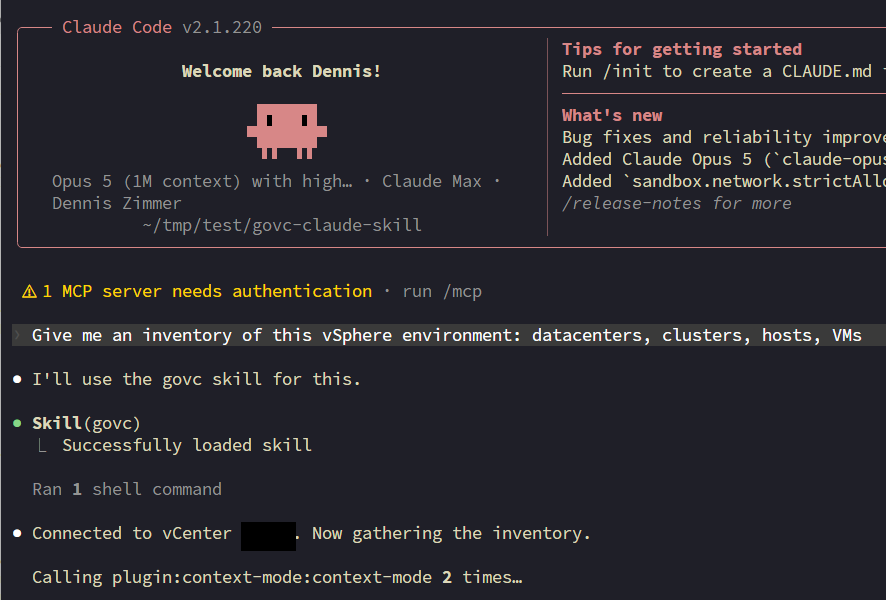
The result is not a raw command dump but an organized report: and note that it noticed things I didn’t ask about: the second datacenter is an empty shell, one cluster has no hosts attached, and it aggregated vCPU/vRAM allocation against physical capacity on its own:
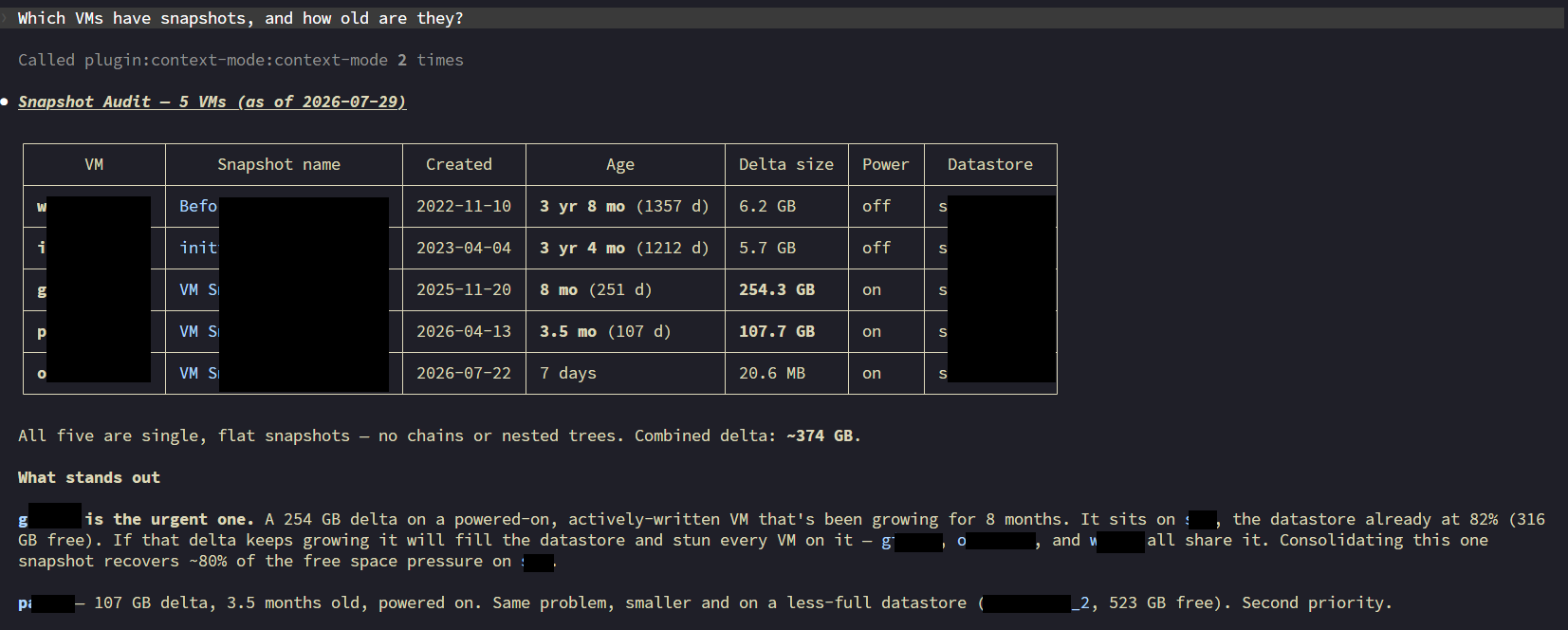
Snapshot audit. “Which VMs have snapshots, and how old are they?” One govc find / -type m -snapshot.currentSnapshot '*', then per-VM detail, then judgment. It found five snapshots totaling ~374 GB of delta, including a 3-year-8-month-old one I had honestly forgotten, and correctly identified the urgent case: a 254 GB delta on a powered-on VM sitting on a datastore that’s already 82% full, with a blast-radius analysis of which other VMs share that datastore:
Root-cause analysis, part 1. This is where it gets impressive. I claimed: “VM w… was down last night. Find out what happened and when.” Instead of hallucinating an incident to please me, Claude checked the evidence and pushed back, the VM had been off for seven months:
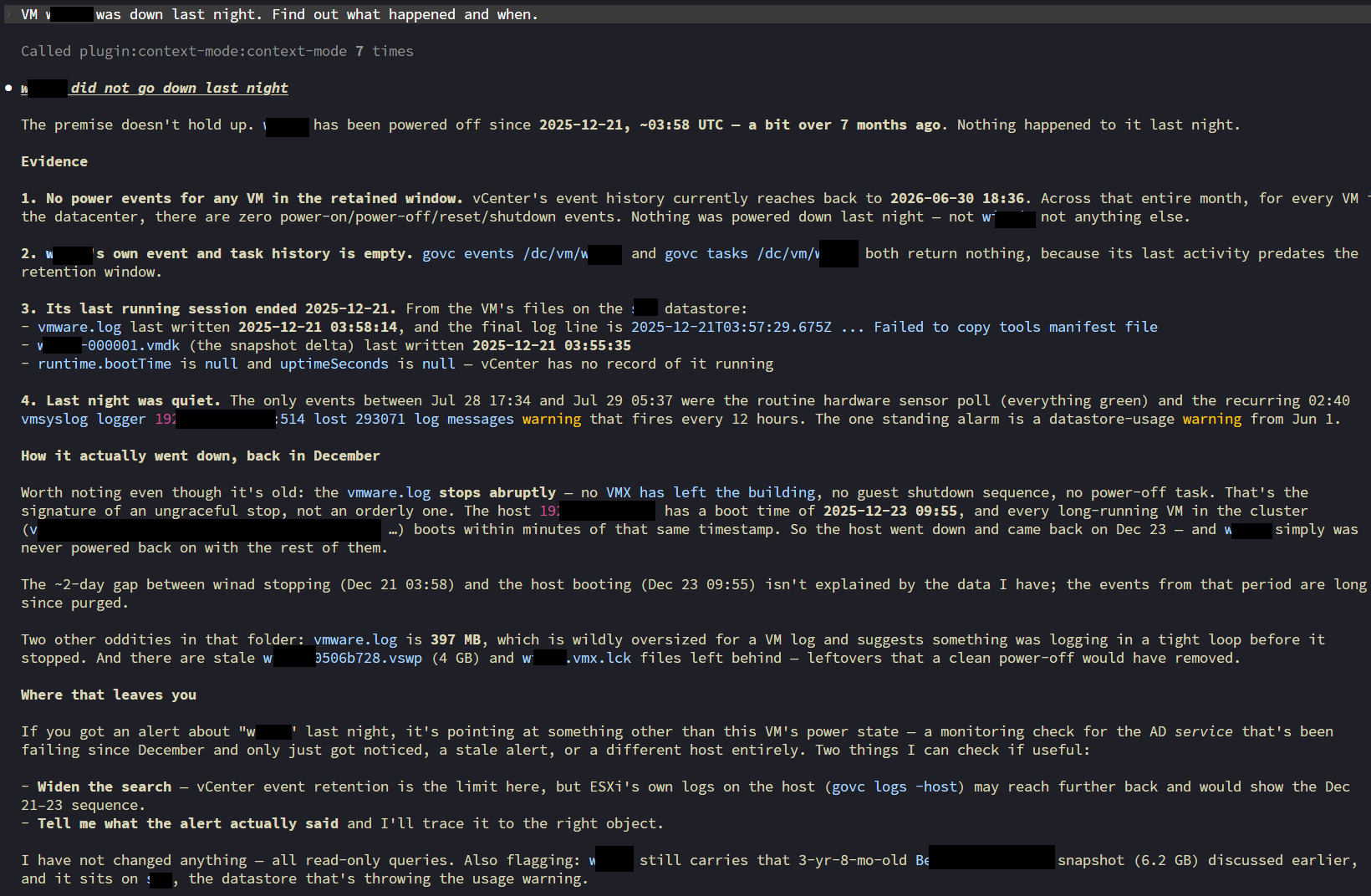
Look at what it did to get there: vCenter’s event history only reached back a month, so it went to the datastore, pulled the VM’s own vmware.log, read the last written timestamps of the delta vmdk, correlated the host’s boot time with every other VM’s boot time to reconstruct a host outage from December, and flagged the stale 4 GB .vswp and .lck files as evidence of an ungraceful stop. That’s genuine ops detective work, all read-only.
Root-cause analysis, part 2. “When was p… down last time?” Same problem, the answer predates vCenter’s event retention, so Claude went to the rotated logs (vmware-16.log) and reconstructed a precise timeline: a deliberate power-off/power-on cycle, performed by a human in the vSphere HTML5 client, five seconds apart, at 10:04:57 UTC on January 27. It even identified the -h5 opID suffix as the fingerprint of the web client:
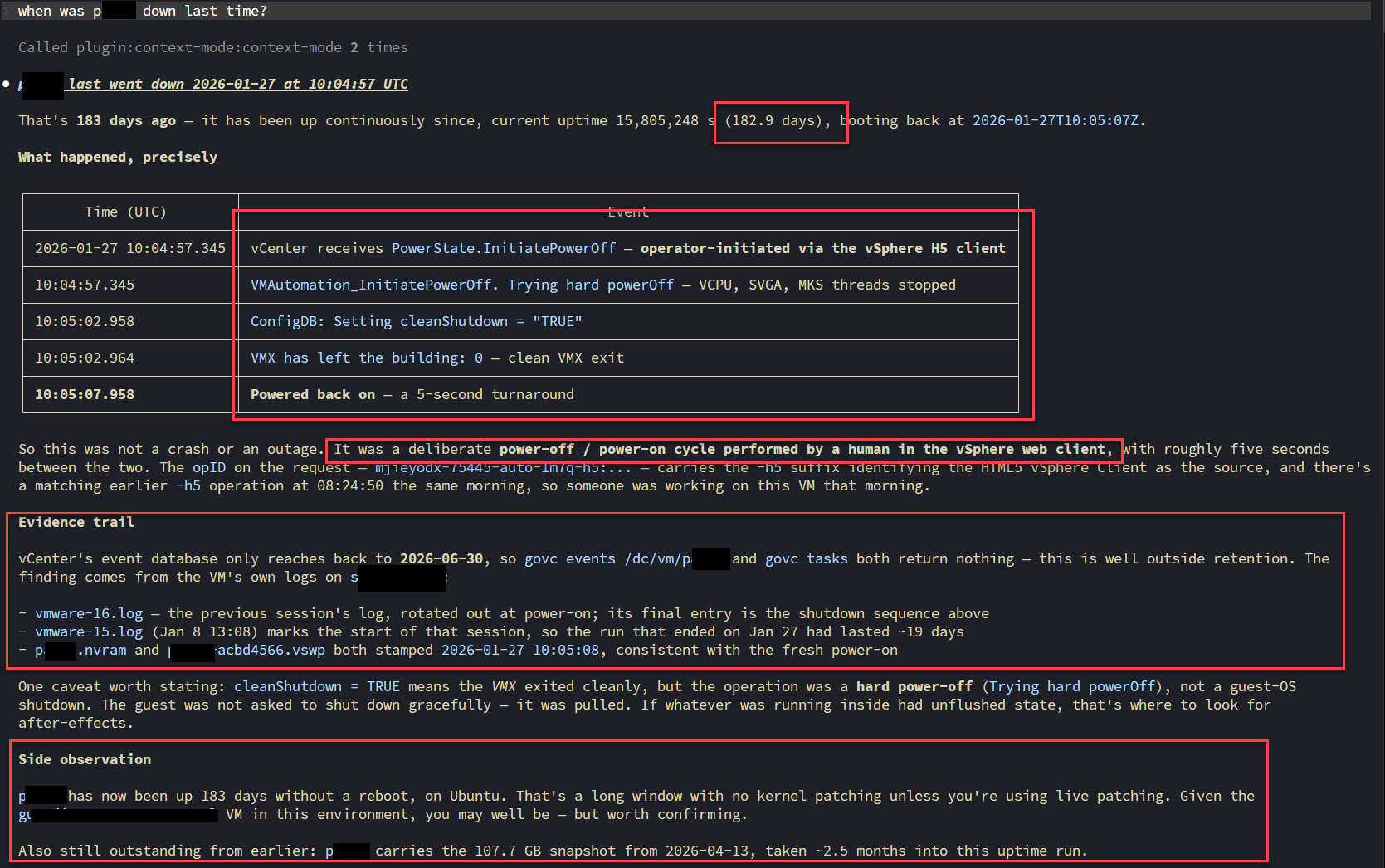
And the side observations are the kind a good colleague makes: 183 days of uptime on an Ubuntu VM means no kernel patching unless live patching is in place, worth confirming, and by the way, that 107 GB snapshot from earlier is still outstanding.
Every one of these ran read-only. The skill’s rules held: at no point did Claude modify anything to answer a question, and it said so explicitly.
Test it without touching production#
The govmomi project ships vcsim, a vCenter simulator that answers nearly every govc call with a fake but consistent inventory:
go install github.com/vmware/govmomi/vcsim@latest
vcsim &
export GOVC_URL=https://user:[email protected]:8989/sdk GOVC_INSECURE=true
Point Claude Code at that, and you can watch how it behaves, including whether it asks before destroying things, with zero risk. I’d recommend every team do this before granting real credentials. It’s also a great way to iterate on the skill itself: tweak the instructions, re-run the same prompts, compare.
Lessons from writing the skill#
A few things that made a real difference:
Teach idioms, not man pages. Claude can always run govc <cmd> -h, and the skill tells it to when unsure. What it can’t discover on its own is which of 300 commands to reach for, in what order, with which pre-checks. That’s the knowledge worth encoding.
Explain the why. “Prefer graceful shutdown because a hard power-off can corrupt application state” works better than a bare rule. LLMs generalize from reasoning; they pattern-match from commandments.
Test on real terrain (the environment will teach you. The skill passed every test against vcsim, then real-world testing immediately surfaced three gotchas the simulator never showed: PowerShell splits unquoted dotted flags like -runtime.powerState before govc sees them (quote them), host.info without arguments fails the moment a vCenter has more than one host, and multi-datacenter setups demand an explicit -dc context) while an empty datacenter answers with a misleading “datastore ‘*’ not found”. Each fix went back into the skill, so the next session already knows. The repo includes the smoke-test scripts (test-windows.ps1, test-linux.sh) that caught these.
Encode your ops culture. The pre-checks before maintenance mode, the oldest-first snapshot deletion, the “don’t mass-delete snapshots on one datastore in parallel”, that’s tribal knowledge that usually lives in a senior admin’s head. A skill is a place to write it down where it actually gets used.
Where this goes#
This pattern, a thin skill over a mature CLI, generalizes to basically every infrastructure tool you already trust: kubectl, esxcli, aws, terraform. The CLI supplies the capability and the audit trail; the skill supplies judgment and guardrails; the human supplies intent and confirmation. For VMware environments in particular, where a wrong command has a blast radius measured in business applications, that division of labor feels right.
The skill is on GitHub at vchaindz/claude-vsphere-skill: clone it into ~/.claude/skills/, point it at vcsim first, and tell me what your environment’s version of “snapshots are not backups” is.
govc is part of the govmomi project: https://github.com/vmware/govmomi. Claude Code skills documentation: https://docs.claude.com.