· Dennis
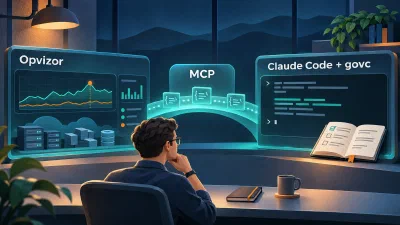
From Alert to Answer: Combining Opvizor, MCP and Claude Code
Combine Opvizor monitoring, its MCP integration and the govc skill for Claude Code to move from alert to a reviewable vSphere investigation plan, faster.
Solutions
Bring Opvizor monitoring evidence to your AI assistant. Investigate faster, review the findings and decide the next step with confidence.

Opvizor brings performance metrics, logs, configuration information and events together across virtual and cloud infrastructure.
Through MCP, your assistant can work with that monitoring context instead of relying on screenshots or manually pasted summaries. The available queries depend on the tools the connected Opvizor server exposes.

Opvizor shows the performance trend and the affected infrastructure.
Your assistant works with monitoring context through MCP.
You get the timeline, supporting evidence, alternative explanations and next steps, and you decide.
After an approved change, compare the relevant metrics with the baseline.
What dashboards can I use to see VM memory ballooning?
Dashboards and knowledge
Which VMs are affected by the datastore latency increase?
Metrics and infrastructure
What changed around the time performance dropped?
Events, logs and configuration
Which resources will run short at the current growth rate?
Capacity forecast
Opvizor plugs your real-time monitoring streams into AI copilots like Claude Desktop, ChatGPT and more through the Model Context Protocol (MCP).
Claude Code also supports MCP servers, so monitoring tools and local investigation tools can work side by side.
Opvizor AI Assistant knows and understands the documentation, bug reports, knowledge base articles and best practices of your virtualization platforms, from Proxmox and KVM to VMware vSphere.
 Claude CodeClaude Desktop
 n8n
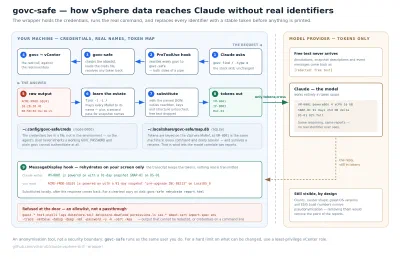
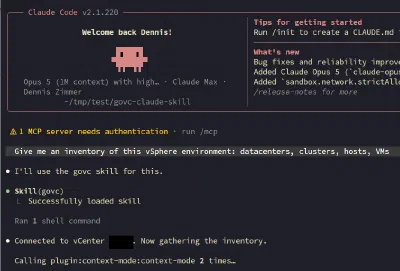
A useful investigation ends with a recommendation your team can review. For hands-on vSphere work, the govc skill for Claude Code and its pseudonymising wrapper add these controls:

· Dennis
Combine Opvizor monitoring, its MCP integration and the govc skill for Claude Code to move from alert to a reviewable vSphere investigation plan, faster.
· Dennis
A follow-up to the govc skill for Claude Code, a pseudonymising wrapper that replaces every VM name, IP, MAC and UUID with a stable token before the model ever sees it, and rehydrates them on your screen.
· Dennis
How a Claude Code skill teaches Claude to run govc safely, read-only reporting, snapshot audits, and guardrails before any destructive vSphere command
We use Google Analytics cookies to understand how the site is used. Nothing is loaded unless you accept. Privacy policy